
Free Barcode Generator with Multi-Format Support
Overview
The software is designed to help users generate barcodes efficiently and without cost. It supports multiple barcode formats, including CODE_128, CODE_39, EAN_13, EAN_8, ITF, and QR_CODE, making it suitable for a variety of labeling needs. The tool enables users to create up to 1,000 barcodes in a single batch using a sequence function, which is ideal for inventory management, product tagging, or event ticketing.
It is particularly useful for small businesses, educators, and individuals managing personal or organizational labeling tasks. The developer did not provide additional background information. Real-world usage scenarios include generating product labels for retail, creating asset tags for office equipment, or producing event passes with QR codes.
The application runs offline, ensuring privacy and accessibility without internet dependency. Its multi-language interface supports English, Traditional Chinese, and Simplified Chinese, broadening its usability across different regions.
Key Features & Capabilities
- Multi-Format Barcode Support: Generates CODE_128, CODE_39, EAN_13, EAN_8, ITF, and QR_CODE barcodes, catering to diverse industry standards and use cases.
- Batch Generation via Sequence: Allows users to generate up to 1,000 barcodes at once using a sequence function, streamlining repetitive labeling tasks.
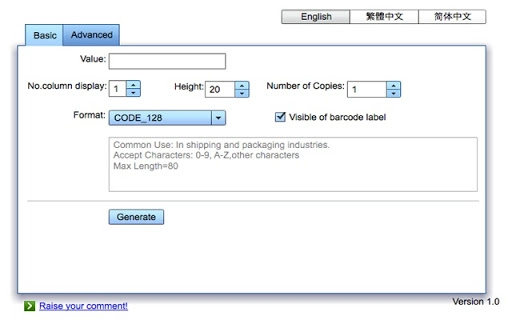
- Dynamic Height and Column Adjustment: Users can customize barcode height and layout columns to fit their printing needs and space constraints.
- Multi-Language Interface: Offers support for English, Traditional Chinese, and Simplified Chinese, enhancing accessibility for global users.
- Flexible Printing Options: Supports printing on A4 paper, multi-page layouts, and multiple copies per label, improving workflow efficiency.
- Label Visibility and Export: Enables users to preview labels before printing and export the final output to PDF for digital archiving.
- Offline Operation: Functions without an internet connection, ensuring data privacy and consistent performance in various environments.
These capabilities allow users to design and produce professional-grade barcodes for inventory tracking, retail labeling, or event management. The ability to export to PDF ensures long-term document retention, while the offline nature makes it suitable for secure environments where internet access is restricted.
User Interface, Workflow & Performance
The software features a clean, intuitive interface designed for ease of use. Navigation is straightforward, with clearly labeled tools and settings accessible from the main dashboard. Users can quickly select a barcode format, input data, adjust layout parameters, and initiate printing or export.
The workflow is optimized for efficiency, especially when generating large batches. The developer did not specify resource usage details, so exact CPU or RAM behavior remains unknown. Performance observations are based on general software behavior patterns.
Stability appears consistent, as the application is designed for repeated use in labeling tasks. The interface remains responsive during standard operations, though real-world performance under heavy loads has not been verified. The software does not require an internet connection, which contributes to predictable performance across different systems.
Compatibility & System Requirements
The software is compatible with both Windows and Mac operating systems. It is available in version 2.0 and has an installation size of 12.5 MB. The developer did not specify exact system requirements, so users should ensure their devices meet standard desktop software expectations.
Compatibility information was partially provided. No additional hardware or driver dependencies were mentioned. The application is designed for desktop use and does not require cloud integration or background services.
Pros and Cons
Pros
- Completely free to use with no hidden costs
- Supports multiple barcode formats for broad compatibility
- Batch generation of up to 1,000 barcodes in one session
- Multi-language interface enhances accessibility
- Offline functionality ensures privacy and reliability
- PDF export and multi-page printing for flexible output
Cons
- Exact system requirements were not listed
- Performance under heavy loads not verified
- No information on update frequency or future development
- Interface design details not specified
FAQ Section
Is this software compatible with both Windows and Mac?
Yes, the software supports both Windows and Mac operating systems.
Can I use this tool without an internet connection?
Yes, the software operates offline, allowing full functionality without requiring an internet connection.
What barcode formats are supported?
The tool supports CODE_128, CODE_39, EAN_13, EAN_8, ITF, and QR_CODE formats.
How many barcodes can I generate at once?
Users can generate up to 1,000 barcodes in a single batch using the sequence feature.
Is the software free to download and use?
Yes, the software is completely free with no cost for downloading or using its core features.
Final Thoughts
This free barcode generator offers a practical solution for users needing to create barcodes for personal, educational, or small business purposes. Its support for multiple formats, batch generation, and offline operation make it a reliable choice for labeling tasks. The inclusion of multi-language support and PDF export adds significant value.
While detailed system requirements and performance data are not available, the software’s core functionality is clear and well-executed. It stands out as a lightweight, efficient tool for those who need a no-cost, no-frills barcode creation experience. For users seeking a secure, accessible, and versatile barcode solution, this tool delivers solid results.
Download Barcode Generator now.







